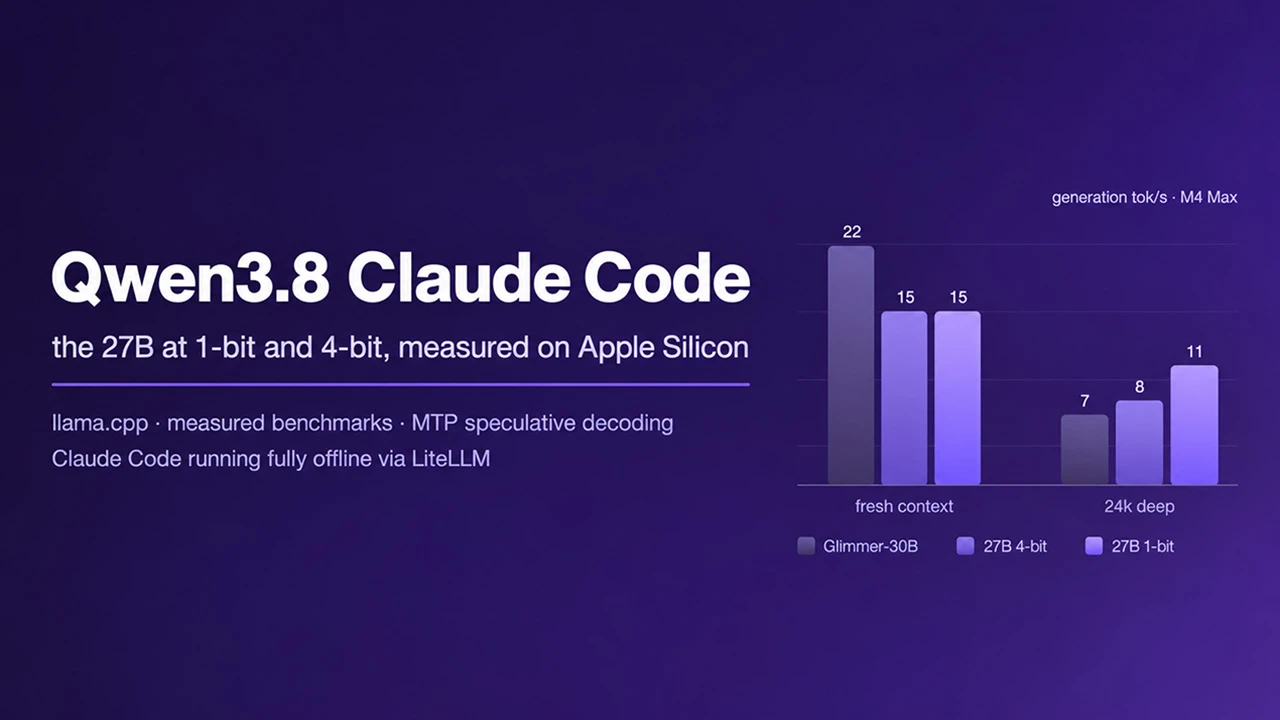
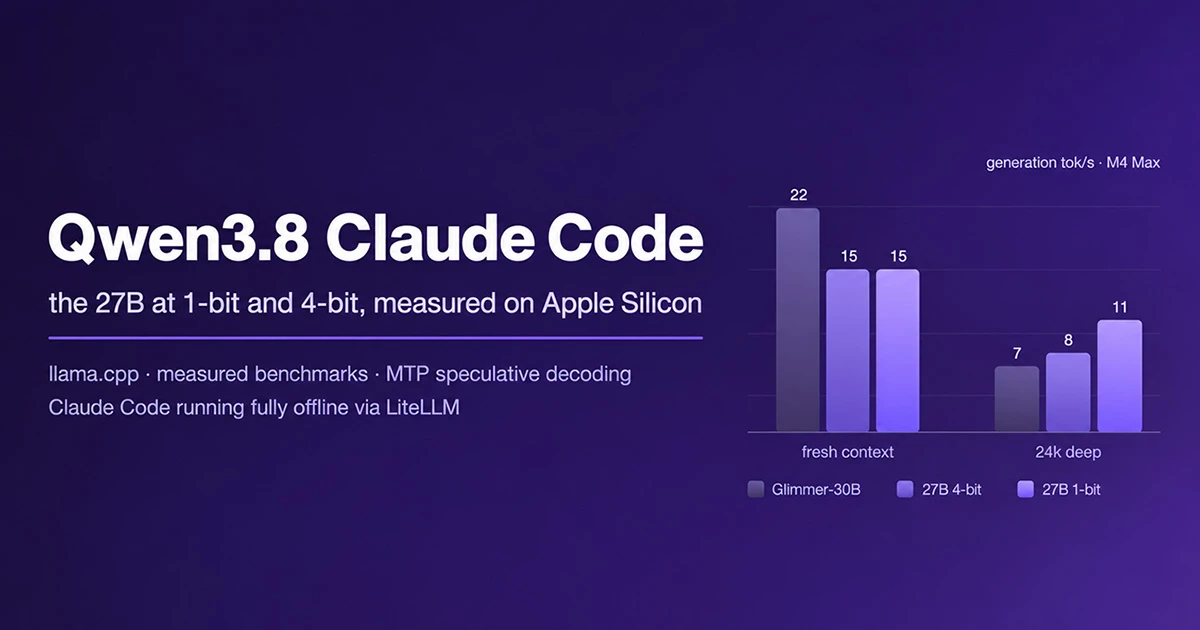

In my previous article I took you through running Meta's Glimmer-30B on a MacBook Pro with 36GB of memory and connecting it to Claude Code through LiteLLM, so that the whole coding agent ran on my own machine with no cloud calls. In this article I will take you through the same setup with Alibaba's Qwen3.8-27B, using the same llama.cpp build and the same benchmark cases, so the results compare directly.
Unsloth published a 1-bit quant of this model at 6.2GB, small enough to fit on an 8GB machine, with a claimed 77% accuracy retention, and that claim has been repeating itself around the internet as proof that you can run a frontier-class model on a laptop. So I measured both tiers side by side: the 1-bit and the 4-bit, on the same hardware, with the same benchmarks and the same agentic test.
What Is Qwen3.8-27B?
Qwen3.8-27B and Glimmer-30B are both reasoning models with built-in speculative decoding, MTP in Qwen's case and dflash in Glimmer's. Qwen3.8-27B also has 262k tokens of native context, and its hybrid Gated DeltaNet attention keeps the memory cost of holding a long context low. It is a vision model as well, but for this project I used it text-only.
What Is Speculative Decoding
A model normally produces one token per forward pass, and on local hardware that pass is the bottleneck. Speculative decoding cuts the number of passes. A cheap mechanism drafts several tokens ahead, the model checks the whole draft in a single pass, and the tokens that match what it would have produced are accepted as a batch. Wrong guesses are thrown away, so the output is identical to running without speculation. The only question is speed.
In the Glimmer project the drafting was done by a second, unrelated model. Qwen3.8 trains its own MTP (multi-token prediction) head for the job, which GGUF exports carry as a separate 1.7GB file, so you download it on its own and pass it to the server explicitly. Whether it actually makes each quant faster is what we will find out.
What Is llama.cpp And LiteLLM
llama.cpp is the open-source inference engine that runs GGUF quantised models locally and exposes an OpenAI compatible API. LiteLLM is a proxy that sits between a client and that API and translates between formats. We will need it because Claude Code speaks the Anthropic Messages API and llama.cpp speaks OpenAI.
Before we start, the honest disclaimer. Everything here was measured on a single machine with a small set of cases and reflects one moment in time. Repeat runs on the same day varied by around 20% with system load. This is an independent project with no affiliation to, or endorsement from, Alibaba, the Qwen team, Unsloth or Anthropic. Check the numbers on your own hardware before you rely on them.
Getting Started With The Setup
In some cases your machine will already have most of what you need, but this walkthrough will help you if you are starting from scratch. Every command below runs from the repository root.
Clone The Repository
gt clone https://github.com/CogniTechSystems/qwen3.8-claude-code.gitInstall
brew install llama.cpp
brew install hf
Qwen3.8 uses the qwen3_5 architecture, supported in llama.cpp since the Qwen3.5 series. The numbers in this article were produced on build b10355, the same build I used for the Glimmer project. Verify with llama-server --version.
Download The Model
hf download unsloth/Qwen3.8-27B-GGUF Qwen3.8-27B-UD-Q4_K_XL.gguf --local-dir models/qwen3.8
hf download unsloth/Qwen3.8-27B-GGUF Qwen3.8-27B-UD-IQ1_S.gguf --local-dir models/qwen3.8
hf download ggml-org/Qwen3.8-27B-GGUF mtp-Qwen3.8-27B-Q4_0.gguf --local-dir models/qwen3.8
The above commands download the 4-bit quant at 17.6GB, the 1-bit quant at 6.2GB (Unsloth Dynamic v3.0), and the MTP head at 1.7GB, which drives the speculative decoding. Qwen3.8 is trained with MTP, but GGUF exports carry the head as a separate file, so it comes down on its own.
If you only want one quant, take the 4-bit on a machine with 24GB or more and the 1-bit below that. The download will take a while depending on your connection, so it may be a good time to grab a coffee. Verify the files with ls -lh models/qwen3.8/ when it finishes.
Start The Server
Standard, serving the 4-bit:
llama-server -m models/qwen3.8/Qwen3.8-27B-UD-Q4_K_XL.gguf \
  --parallel 1 --cache-reuse 256 \
  --host 127.0.0.1 --port 8000 \
  -c 131072 -ngl 99 --jinja
With MTP speculative decoding:
llama-server -m models/qwen3.8/Qwen3.8-27B-UD-Q4_K_XL.gguf \
  -md models/qwen3.8/mtp-Qwen3.8-27B-Q4_0.gguf \
  --spec-type draft-mtp --spec-draft-n-max 16 -ngld 99 \
  --parallel 1 --cache-reuse 256 \
  --host 127.0.0.1 --port 8000 \
  -c 65536 -ngl 99 --jinja
For the 1-bit, swap the model filename for Qwen3.8-27B-UD-IQ1_S.gguf. It has the memory headroom to keep -c 131072 in every mode.
The two commands differ in the speculation flags and the context size, and there is a reason for that which is worth understanding before you hit it yourself. The 4-bit weights plus the MTP head plus a 128k context still exceed the GPU memory of a 36GB machine, and the server dies mid-request with an Insufficient Memory error. That is why the speculation modes serve 64k on the 4-bit. The other memory note is that only one layer in four is a conventional attention layer with a KV cache, so a 128k window costs about 8GB; a model with attention in every layer would need roughly four times that.
Or use the launcher, which handles all of this for you:
zsh start.sh [mode] [quant]Mode is empty for standard, mtp for speculation, agent for MTP with thinking disabled, or 32k for machines with less memory. Quant is empty for the 4-bit or 1bit for the 1-bit. So zsh start.sh mtp 1bit gives you the 1-bit quant with speculative decoding on.
Here is what the flags mean, because a few of them matter a great deal in practice:
| Flag | Meaning |
|---|---|
-ngl 99 | All layers on GPU |
-c 131072 | 128k context; the model is 262k native, so no YaRN or RoPE flags are needed |
--jinja | Enables the model's chat template, required for tool calling |
--parallel 1 | One slot with the full context; with the default 4 slots large prompts fail |
--cache-reuse 256 | Reuses cached prompt prefixes, essential for agent workloads |
-md ... | The MTP head file from the download step |
--spec-type draft-mtp | Enables speculation from the MTP head; defaults to none |
-ngld 99 | MTP head on GPU |
--spec-draft-n-max 16 | Tokens drafted per round; replaces the removed --draft-max |
Keep --jinja in or clients will report that the model does not support tools, and only bind 0.0.0.0 on a network you trust.
Verify The Install
Before we go any further, a quick check that the server is actually serving:
curl http://127.0.0.1:8000/healthThe endpoint returns {"status":"ok"} when the model is loaded. Then send a real request:
curl -s http://127.0.0.1:8000/v1/chat/completions -H "Content-Type: application/json" \
  -d '{"model":"qwen3.8","messages":[{"role":"user","content":"say hi"}],"max_tokens":600}' \
  | python3 -c 'import json,sys; b=json.load(sys.stdin); m=b["choices"][0]["message"]; \
print("answer:  ", m.get("content")); \
print("thinking:", (m.get("reasoning_content") or "")[:120]); \
print("speed:   ", round(b["timings"]["predicted_per_second"],1), "tok/s")'
You should see output like this, with the speed depending on your quant and your hardware:
answer:   Hi there!
thinking:
speed:    24.6 tok/s
Qwen3.8 is a reasoning model and thinking is on by default. The reasoning comes back in reasoning_content and the answer in content, and both come out of the same token budget, so a small max_tokens produces an empty answer. The thinking line can also come back empty, because the model decides how much reasoning a request needs and on a trivial prompt it may simply answer directly. An empty thinking: with a populated answer: is normal.
Thinking is controlled with the reasoning_effort request parameter, and "none" disables it entirely. In mtp mode, speculation is only active if draft_n appears in the response timings, which is the quickest way to confirm it is doing anything at all.
Running The Benchmarks
python3 bench/run_bench.py --target local --label baseline-4bitThis runs the cases in bench/cases.json, prints pass/fail and tok/s, and writes JSON to results/. It works with any OpenAI compatible server. The label names the run and becomes part of the output filename, so put the quant and the mode in it (baseline-4bit, mtp-1bit, and so on) that every result file says what produced it. The first three cases are identical to the Glimmer repo, so those numbers compare directly.
To reproduce the table properly, the order matters. On a fresh server, run bench/depth_bench.py first, because it sends a single roughly 24k-token prompt, and once the prefix cache has absorbed that prompt the prefill number means nothing. Then run the suite on the same server. Restart in mtp mode and run the suite again; the ratio between the two mean figures is the MTP row.
The Numbers
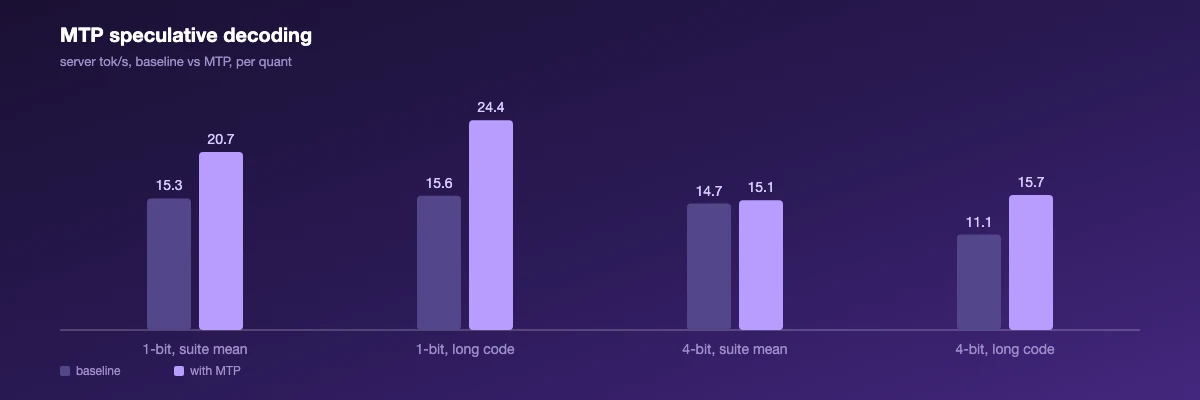
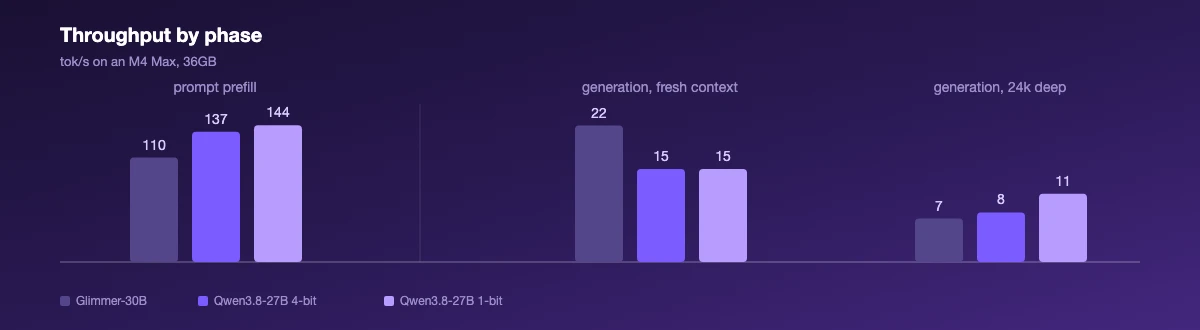
Throughput by phase, and MTP speculation gains, for both quants measured back to back.
All numbers below come from a MacBook Pro (M4 Max, 36GB) on llama.cpp b10355, measured 2026-08-23, both quants back to back under the same conditions.
| Scenario | Qwen3.8-27B 1-bit | Qwen3.8-27B 4-bit | Glimmer-30B, same machine |
|---|---|---|---|
| Generation, fresh context | ~15 tok/s | ~15 tok/s | ~22 tok/s |
| Generation, ~24.5k tokens deep | ~11 tok/s | ~8 tok/s | ~7 tok/s (at ~29k) |
| Prompt prefill | ~144 tok/s | ~137 tok/s | ~110 tok/s |
| MTP speculative decoding | 1.35x, 1.56x on long code | 1.03x, 1.41x on long code | 0.9–1.0x (dflash) |
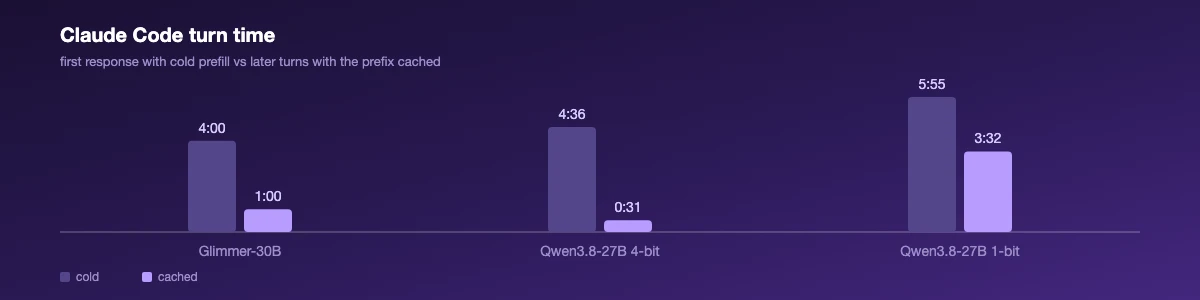
| Claude Code first response (cold) | 5 min 55 s | 4 min 36 s | ~4 min |
| Claude Code later turns (cached) | 3 min 32 s, incoherent | 31 s | ~1 min |
| Benchmark cases | 3/4 pass | 3/4 pass | n/a |
| "Create a deep neural network" | Fails to understand the request | Complete, structured implementation; one runtime bug | n/a |
If we take a look at what the table actually means in practice, a few things stand out.
The two quants generate at the same speed on fresh context, so the difference between them is capability and not speed. The 6.2GB file is not a faster ticket to the same model.
Asked to create a deep neural network, the 1-bit replied "I'm not sure what you mean there" and hallucinated a file path. In a fresh session it produced no file at all, ending its output on a leaked </think> tag. Its cached turns are not only slower than the 4-bit's, they degrade: asked what port start.sh serves, it answered "I can't tell from" and stopped.
The 4-bit understood the same request immediately and wrote a 10.7KB layered implementation with backpropagation, an XOR demo and a regression demo. The file compiles, then hits an IndexError in the backward pass when you run it. A second, independent attempt under the exact test protocol produced a different implementation with the same class of bug. Backpropagation indexing appears to be precisely where this model's unaided code breaks.
Neither of them is frontier-class unaided, but one is a junior developer having a bad day and the other did not understand the question. The accuracy a 1-bit quant gives up is concentrated exactly where the agentic claims live.
MTP speculation is worth having on this model. It is the first speculation setup across both of my projects that clearly wins: 1.35x overall on the 1-bit and up to 1.56x on long code generation, against the break-even dflash results on Glimmer. Gains on the 4-bit are smaller, and short answers see no benefit either way.
The one failed benchmark case is thinking, not capability. The long-code case fails on both quants in exactly the same way, because the model spends the whole 3072-token budget on reasoning and returns no code. The fourth case is the identical prompt with reasoning_effort set to none, and it passes on both. When thinking is on, size max_tokens for the reasoning plus the answer.
Driving Claude Code Against Your Own Machine
A Claude Code session running entirely against a local llama.cpp server, no cloud calls.
For Claude Code, serve the model with zsh start.sh mtp. Add 1bit to run the 1-bit, though the table above should tell you what to expect from it as an agent.
Thinking stays on here, because the model's agentic reasoning is the whole point of running it, but it has to be bounded. Left unbounded, the model can reason for thousands of tokens before every single tool call and one turn takes tens of minutes. The LiteLLM config caps it by sending reasoning_effort: low with every request, which is the depth control Qwen3.8 documents. If turns still run too long for your hardware, zsh start.sh agent disables thinking entirely with --reasoning-budget 0, which makes turns fast and predictable at the cost of the reasoning the model is built around.
python3.13 -m venv .venv
.venv/bin/pip install "litellm[proxy]" "fastapi<0.116"
LiteLLM does not run on Python 3.14 and current FastAPI releases break it, so both of those pins matter. With llama-server running:
.venv/bin/litellm --config litellm-config.yaml --port 4000 --host 127.0.0.1Then in a new terminal, change to the repository root first. Claude Code works on whatever directory it is started from, and started anywhere else it will happily answer questions about the wrong files:
export ANTHROPIC_BASE_URL=http://127.0.0.1:4000
export ANTHROPIC_AUTH_TOKEN=local
export ANTHROPIC_MODEL=qwen3.8
export ANTHROPIC_DEFAULT_HAIKU_MODEL=qwen3.8
export API_TIMEOUT_MS=600000
export CLAUDE_CODE_MAX_CONTEXT_TOKENS=65536
export CLAUDE_CODE_MAX_OUTPUT_TOKENS=8192
export DISABLE_NON_ESSENTIAL_MODEL_CALLS=1
claude --disallowedTools Artifact
CLAUDE_CODE_MAX_CONTEXT_TOKENS must match the served context: 65536 for the 4-bit in mtp or agent mode, 131072 for the 1-bit. The rest point the client at LiteLLM, keep the background model local, and give the cold prefill time to finish.
That last variable and the --disallowedTools flag fix two failures I hit while building this:
- "Failed to initialize samplers: failed to parse grammar" on every request. llama-server compiles the client's tool schemas into a sampling grammar. The Artifact tool's schema contains a regex with
\d, the converter passes the escape straight through, and the grammar parser rejects it.--disallowedTools Artifactremoves the one schema that trips it. - Prefix cache eviction between turns. With
--parallel 1there is one cache slot. Claude Code's small background calls land between turns, evict the cached system prompt, and force a full re-prefill on every real turn.DISABLE_NON_ESSENTIAL_MODEL_CALLS=1stops them.
Go ahead and ask it something that forces a tool call, for example "What files are in the bench directory?" The correct answer lists the files in the repo, and your llama-server terminal shows the requests arriving as it works. The first response is slow because the whole system prompt has to prefill; later turns in the same session reuse the cache and come back much faster. Exit with Ctrl+C twice.
Exposing The Model To Your Network
agent/server.py is a Python harness that external systems connect to over HTTP. Each POST to /task runs a tool-calling agent loop against the local model, with list_files and read_file sandboxed to the repository, and returns the answer plus a trace of every tool call that was made.
python3 agent/server.pyIt listens on 0.0.0.0:8090. Find your machine's address with ipconfig getifaddr en0, then from any machine on the network:
curl -s http://<mac-ip>:8090/health
curl -s http://<mac-ip>:8090/task \
  -d '{"prompt": "How many benchmark cases are in bench/cases.json?"}'
Requests are served one at a time to match --parallel 1, and llama-server can stay bound to 127.0.0.1 so that only the harness port faces the network. There is no authentication, so only run it on a network you trust.
Troubleshooting
Every error in the table below was hit while I was building this, so if you hit one of them you are not doing anything particularly clever.
| Symptom | Cause | Fix |
|---|---|---|
command not found: pip or hf | Hugging Face CLI not installed | brew install hf |
unknown model architecture: 'qwen3_5' | llama.cpp predates the Qwen3.5 series | brew upgrade llama.cpp (b10355 works) |
| Server exits listing spec types | Invalid --spec-type value | Use draft-mtp for this model's built-in MTP |
model doesn't contain MTP layers | Main GGUF has no MTP head | Pass the separate head with -md |
"--draft-max": the argument has been removed | Renamed flag | Use --spec-draft-n-max |
| Speculative speed identical to baseline | Speculation not enabled | Add --spec-type draft-mtp; confirm draft_n in timings |
| Insufficient Memory mid-request, requests 500 | 4-bit weights + MTP head + 128k context exceed GPU memory | Serve 64k in speculation modes; start.sh does this |
failed to parse grammar | \d in a tool schema regex breaks the converter | claude --disallowedTools Artifact |
| Claude Code turns run for many minutes | Unbounded thinking | Confirm reasoning_effort: low in the LiteLLM config; start.sh agent as a last resort |
| Claude Code invents file listings | Started from a different directory | Start claude from the repository root |
Empty content in response | Reasoning used the whole token budget | Raise max_tokens, or send "reasoning_effort": "none" |
Context size has been exceeded | Default 4 slots share one context pool | Add --parallel 1 |
ModuleNotFoundError: No module named 'proxy_server' | LiteLLM on Python 3.14, or FastAPI too new | venv on 3.13, pip install "fastapi<0.116" |
| "will retry, check your network" | Client timeout during cold prefill | export API_TIMEOUT_MS=600000 |
HEAD /api/hello 404 in the LiteLLM log | Claude Code's connectivity probe | Harmless, ignore it |
Conclusion
The question this project set out to answer was whether the 1-bit quant delivers what those posts claim: a frontier-class model on an ordinary computer. It does not.
The 1-bit runs, it chats, and it answers simple lookups. But asked to create a deep neural network it did not understand the request in conversation, produced nothing at all in a fresh session, and its multi-turn answers degrade into fragments. If a model fits in 8GB and cannot code, it is not a smaller frontier model. It is a different, lesser thing wearing the same name.
The 4-bit is the real article. It understood every request, worked as a Claude Code agent with 31-second cached turns, and wrote a complete, structured neural network implementation, though with a runtime bug and at roughly ten times the wall time Glimmer-30B needed for the same test.
Against Glimmer the trade is clear. Glimmer generates faster on fresh context and finishes tasks sooner. Qwen3.8 is faster where agents actually operate, deep in context, it holds a 262k window against 32k, and it is the first model across these projects whose speculative decoding actually pays. Its weakness is deliberation: even capped, it spends more time thinking about work than Glimmer spends doing it.
The practical guidance is short. On a machine with 24GB or more, run the 4-bit and cap the reasoning. On less than that, run the 1-bit for chat and lookups and expect nothing agentic from it. And test the claims yourself before repeating them, because every number in this article took one evening and one laptop to produce.
I hope you have enjoyed this article and found it useful. In the near future we will be releasing some more open-source projects, and if you have any questions about getting a local LLM running on your own hardware, please feel free to reach out and I will be happy to assist where possible.
Comments are provided by Disqus, which sets third-party cookies. Choose Accept all in to view and join the discussion.